
How does Patch OEE determine the effective OEE Target % ?
The OEE Target % can be specified in Patch OEE at many different levels. This article describes what the effective OEE Target % is that Patch OEE uses, for instance to calculate the Target Output.
The OEE Target % is determined as follows:
- Derived from the Production Planning upload: Planned Efficiency %
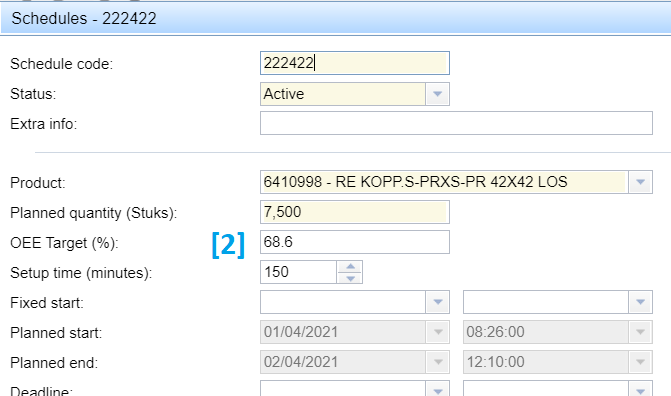
When the Production Planning upload file contains both a planned Start- and a planned End time for the schedule, or it contains a Planning Efficiency % for the schedule, Patch OEE uses the information from the Production Planning upload file to derive the Planned Efficiency % as was used by the Planners for generating the uploaded production planning. The derived Planned Efficiency % is visible in the schedule tooltip in the Patch Planboard as 'Planned Efficiency %' and Patch OEE registers it at the Schedule's OEE Target % field, see at [2] below. The Schedule's OEE Target % field is updated at every production plan upload.
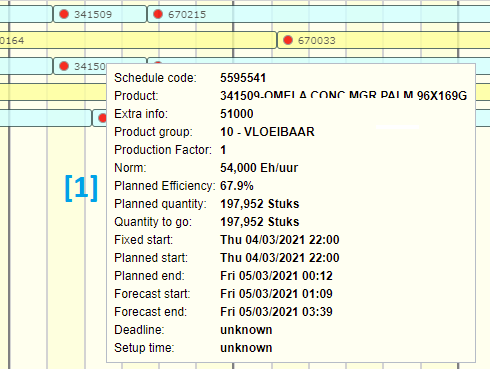
In case a schedule is planned at multiple production lines, the Planned Efficiency % could (theoretically) be different at each production line. In this case, Patch OEE registers the lowest at the Schedule's OEE Target % field. The Schedule's Audit log shows the Planned Efficiency % in detail as derived for each production line.
Setting 'Ignore Planned Efficiency in OEE Target'
When Patch OEE should not derive the OEE Target % from the Production Planning upload file, either the planned Start- or End time could be removed from the file. Or the Patch OEE setting 'Ignore Planned Efficiency in OEE Target' (default=Off) could be enabled for your site by the Patch OEE Support Desk.
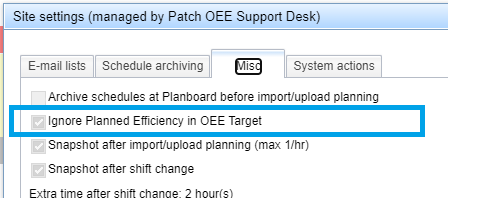
When this setting is enabled, Patch OEE still uses the Planned Efficiency % from the production plan upload when forecasting future times (e.g. on the Patch Planboard and at the Live Progress tab for the current production orders). But then for historical data, Patch OEE ignores the Planned Efficiency % and uses the OEE Target % as specified at level [2] and further as documented below.
- Production Planning administration: OEE Target % set at the Schedule
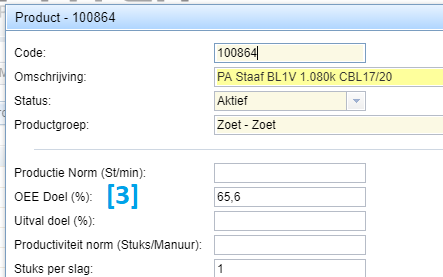
- Product base administration: OEE Target % set at the Product
- Product group base administration: OEE Target % set at the Product group
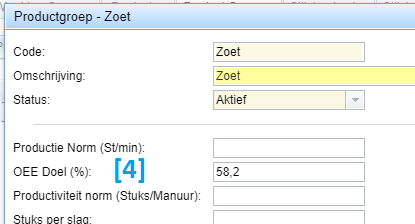
- Machine base administration: OEE Target % set at the Machine
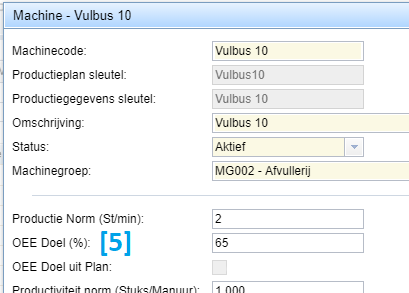
Patch OEE determines the effective OEE Target % by checking the administrations in the order as listed above and stops at the first item not empty. Or in other words, the most specific OEE Target % is used.
Note: Patch OEE uses the effective OEE Target % for visualization only (e.g. coloring the actual OEE % green or red). The effective OEE Target % is not used to calculate the actual OEE %.
Target Output calculation
Patch OEE calculates the 'Target Output' as follows:
- For a reporting time period in the past, Patch OEE uses the machine's actual production history to know what schedules were actually produced and from when till when. The actual schedule duration is used to calculate the theoretical maximum output for each schedule, based on the schedule's effective Production Norm (see 'how does Patch OEE determine the effective Production Norm' for details). The theoretical maximum output is then multiplied by the effective Target OEE% for that schedule.
Note: the actual schedule durations from the machine's production history are corrected for non-production time periods as registered in the machine's production history. So any time period where, according to the downtime codes assigned, no OEE is registered are left out of the Target Output calculation.
Note: when feature 'OEE Target from Plan' is enabled for the machine (see feature 'OEE Target from Plan' for details), Patch OEE uses the forecasted machine production timeline from an earlier snapshot of the Patch Planboard instead of the machine's actual production history to determine what schedules were planned to produce from when till when. These forecasted schedule durations from the snapshot are then used instead of the actual schedule durations from the production history. The rest of the calculation remains the same. The non-production shifts from the machine's week plan in the machine base administration are not taken into account as these are already included in the forecasted schedule durations.
- For a reporting time period in future, Patch OEE uses the forecasted machine production timeline from the live Patch Planboard to know what schedules are planned to produce and from when till when. Patch OEE uses the live forecast from the Planboard at the time the report / Target Output is requested. The forecasted schedule durations are then used to calculate the Target Output using the effective Target OEE% of each schedule. Note: the forecasted schedule durations at the Patch Planboard are already corrected for non-production shifts as configured in the in Patch OEE machine base administration.
The Target Output is presented at various Patch OEE reports as well as in the OEE Periodic view and data exports.
Max Output calculation
Patch OEE calculates the 'Max Output' as follows:
- For a reporting time period in the past, Patch OEE uses the machine's actual production history to know what schedules were actually produced and from when till when. The actual schedule duration, minus downtime registered as non-OEE, or as Routine Stop or as Planned Stop, is used to calculate the theoretical maximum output for each schedule, based on the schedule's effective Production Norm (see 'how does Patch OEE determine the effective Production Norm' for details).
The Max Output is presented in the OEE Periodic view.
Feature 'OEE Target from Planboard'
When the feature 'OEE Target from Planboard' is enabled for a machine (default=Off), Patch OEE uses photo's (snapshots) from the Patch Planboard to determine the OEE Target %, based on what the production planning looked like in the requested time period. The snapshots are taken at each new production planning upload, or at specified times, and at each shift change-over.
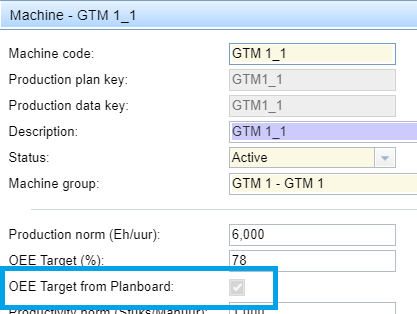
Note: when the feature 'OEE Target from Planboard' is enabled, it overrules the standard mechanism described above to determine the effective OEE Target % !
This feature is only applicable when analyzing data from the last 180 days and for a maximum of 7 days in total, and not grouped by Hour. Otherwise Patch OEE applies the standard mechanism described above to determine the effective OEE Target %.
Note: the 'OEE Target from Planboard' feature may be impacted by older schedules still at the Planboard that have not been produced fully and are not yet archived at the time the snapshot is taken. This can be avoided by enabling option 'archive planboard before import/upload planning' (default=Off). When this option is enabled, all active schedules at the Patch Planboard, except for the ones currently in production, are set to status 'Archived' just before the new uploaded production planning is imported. This ensures the snapshot only contains the schedules from the last uploaded production planning file.