How does Patch OEE calculate the losses and KPI's?
This instruction describes how Patch OEE calculates the losses and KPI's. All calculated losses and KPI's are available in the OEE Periodic view and in many other Patch OEE views, reports and dashboards.
Topics available in this instruction are:
- Downtime losses
- Speed loss calculation
- Off-spec / Quality loss calculation
- Avg. Production calculation
- Avg. Output calculation
- Max Output calculation
- Target Output calculation
- Other KPI's calculation
Downtime losses
To determine the downtime loss for each OEE loss category, Patch OEE totals the duration of all stops with a stop code assigned to that OEE loss category. This total duration is compared to the total available time ('used time') to calculated the loss percentage for the OEE category.
Speed loss calculation
For calculating the OEE Speed loss, Patch OEE first determines the actual 'Production time' for each Product produced and the actual Registered output ('Quantity registered'). Using the effective Production Norm it then calculates how much theoretical Production time should have been used for producing the actual Registered output when the production line would have produced at Production Norm exactly. The time difference between the actual Production time and the theoretical Production time is considered the time lost due to Speed loss. The lost time is compared to the total available time ('Used time') to calculate the Speed loss percentage.
Note: the Speed loss percentage reported by Patch OEE is the OEE loss percentage, not the difference between the Actual capacity (e.g. in Kg/Hour) and theoretical capacity ('Production Norm'). This is on purpose to make the Speed loss percentage comparable to the other OEE loss percentages.
Note: the Speed loss calculation can be disabled in Patch OEE. When disabled, the Speed loss will be fixed to 0%. Still the actual Registered output, the Avg. Production, et cetera are available in Patch OEE views and reporting, but these actuals are not compared to the Production Norm. Disabling the Speed loss calculation can be done on demand by the Patch OEE Support Desk and the setting applies to the entire Patch OEE implementation, so all OEE bottleneck machines being monitored.
Off-spec / Quality loss calculation
For calculating the Off-spec / Quality loss, Patch OEE totals the Rejects/Waste for each Product produced. Using the Production Norm it then calculates the total time used for producing these Rejects/Waste. This total time is compared to the total available time ('used time') to calculated the Off-spec / Quality loss percentage.
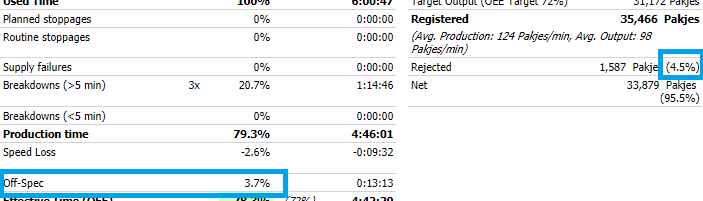
In addition to the Off-spec / Quality loss percentage, which represents the OEE loss % (3.7% in example below), Patch OEE also reports the Off-spec / Quality loss as percentage of the Actual registered output (4.5% in example below). This percentage is for information only, it is not used in the OEE losses.
Avg. Production calculation
The Average Production (Avg. Production) KPI is the Registered Quantity compared to the registered Production Time (i.e. only when the machine was producing, so excluding any downtime).
Avg. Output calculation
The Average Output (Avg. Output) KPI is the Registered Quantity compared to the total available time ('Used time'). So including any downtime.
Max Output calculation
The Maximum Output KPI is calculated as the machine's total available time ('Used time'), minus all Planned Stops and minus all Routine Stops, times the effective Production Norm for each of the products produced according to the machine's production history timeline. So basically the theoretical production output assuming the machine is producing without interruption other than for Planned stops or Routine stops.
Target Output calculation
The Target Output KPI is calculated as the machine's total available time ('Used time'), times the effective Production Norm and the effective OEE Target% of each of the products produced according to the machine's production history timeline.
Other KPI's calculation
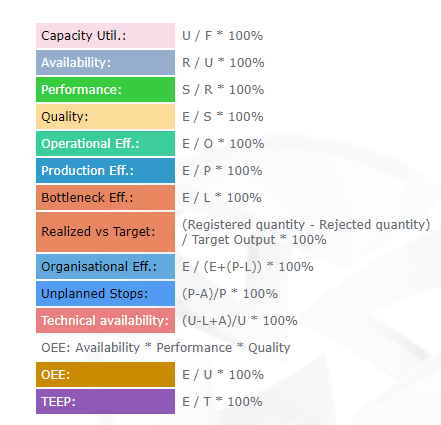
Patch OEE supports various other KPI's. The formula for each KPI can be found via menu Help - option 'OEE Categories & KPI'.